
CyberSentry AI / For managed service providers
Recurring server incidents, resolved under your control.
CyberSentry explains each server finding in plain language and runs a small set of Linux fixes your technicians approve, with a check afterwards and an audit record.
- Runs alongside your RMM and EDR
- No agent on each server
- Technicians approve every port and file fix
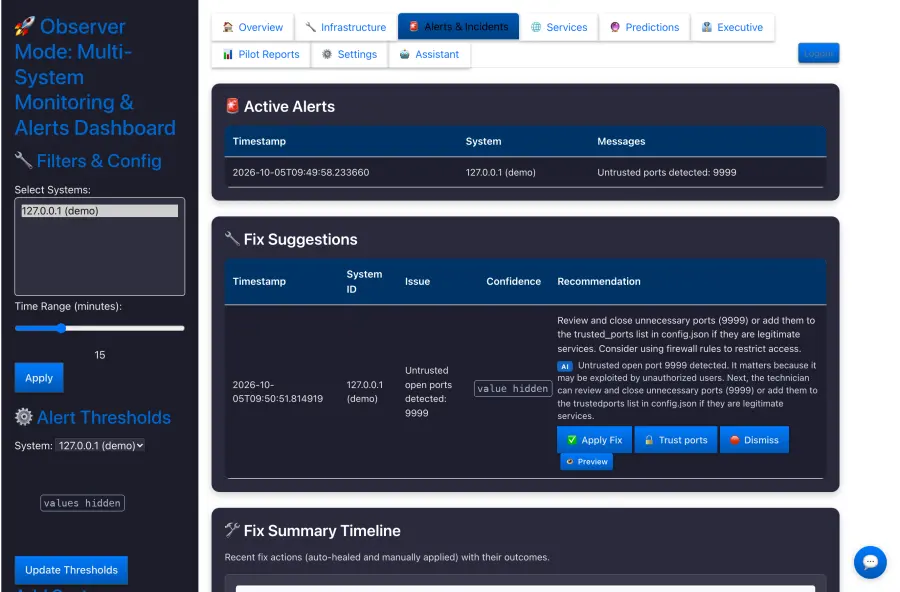
The same incidents, across many environments.
Your RMM raises the alert. A technician still has to connect, work out what changed, decide what is safe, fix it, and show the client what was done.
Alert investigation
Which server, which process, port or file, since when, and whether it matters.
Repetitive remediation
Runaway jobs, unexpected listening ports and changed configuration come back and get fixed by hand each time.
Proof for the client
After the fix, someone has to record what was done and confirm that it worked.
CyberSentry hands the technician a finding that is already explained and ranked, with one proposed fix. On Linux, an approved fix runs through a guarded helper, is checked afterwards and lands on the record.
Alongside your RMM and EDR, not instead of them.
Platforms such as NinjaOne, ConnectWise, Datto, Kaseya and Microsoft Defender may already automate a lot. CyberSentry has a narrower job on supported servers.
Your existing tools keep doing
- Endpoint management, patching, scripting and their own automation.
- Threat detection and response on endpoints.
- Ticketing, PSA and client reporting workflows.
- Backups and specialist security controls.
CyberSentry adds, on supported servers
- Findings in plain language, ranked, with one proposed fix.
- A few controlled Linux fixes: stop a process, close an untrusted port, restore a changed /etc file from a backup you placed.
- A check after each fix that says how it checked.
- An audit record of what was found, decided and done, exportable as CSV or JSON.
CyberSentry has no integrations with RMM, PSA, ticketing or SIEM tools today. RMM and ticketing integrations are planned.
Your technicians stay in control.
CyberSentry starts by watching. How far it goes is your decision.
- 01
Observe
CyberSentry
Watches supported servers and learns each one’s normal pattern. Changes nothing.
Findings with evidence
- 02
Recommend
CyberSentry
Explains what probably happened, ranks it, and proposes one specific fix.
Plain-language explanation
- 03
Approve
Your technician
Applies, previews or dismisses each fix. On Linux, CyberSentry runs the approved fix and checks it.
Checked · recorded
- 04
Self-heal Off by default
Only if you switch it on
Stops processes on the known-bad list by itself. Port and file fixes still wait for approval.
Checked · recorded
Permissions you can read
Onboarding uses an admin credential once, pins the host key, and leaves a restricted SSH key, a short sudo allow-list and a guarded helper. No monitoring agent runs on each server.
A record for every action
An audit row opens before each action and records the outcome. Previews, dismissals and changes to the self-healing switch are recorded too. Today the record names a role, because there is one login.
How an MSP pilot fits today.
CyberSentry is early-stage and lab-demonstrated. A pilot is set up around what it does well now.
A practical starting point
- Your own internal servers, or one client environment you choose.
- Linux servers for monitoring and supported fixes; Windows servers watched read-only.
- Watch-only first, with self-healing off unless you ask for it.
- Installation with our team on a Linux server inside that environment.
What to know before you plan
- One installation serves one environment, with a single login. A multi-tenant MSP console with roles is planned, not built.
- No packaged installer yet; we install it with you.
- Not yet validated at customer scale. The pilot is how we measure fit together.
Explore a controlled pilot.
Free, about 8 weeks, supported by our team and agreed in writing before anything is connected.
- A first callHow you run client servers today, and whether CyberSentry fits.
- Terms in writingScope, data access, confidentiality, data protection, security and the outcomes we will review.
- Install togetherOn a server in the environment you choose, connected to the systems you select. Watch-only to start.
- About 8 weeksA 30-minute check-in every two weeks on real findings and suggested fixes.
- ResultsA written summary from the stored records. Then you decide whether to continue.
Ask CyberSentry how it fits your stack.
Put your RMM, EDR, access and pilot questions to our AI technical companion in a live conversation, without booking a sales call.
- What it is
- A voice and video conversation with an AI, run by Tavus. You talk to an AI, not a person.
- What you need
- A microphone. Your camera stays off unless you turn it on.
- If it cannot start
- It is sometimes busy or unavailable. Use the contact form instead: our team reviews every enquiry. The short answers cover the same questions in writing.
 CyberSentry AIAI technical companion
- Voice and video
- Camera optional
- Up to 5 minutes
Start with one of these questions, or ask your own.
- What can CyberSentry automate today?
- How does CyberSentry connect to Linux and Windows?
- Does CyberSentry replace my existing RMM or EDR?
- What infrastructure access is required?
- How does the controlled pilot work?
Nothing starts until you press Start on the next screen. A question you pick goes in as your first message; if the companion misses it, ask it aloud.
Talk to our team.
Tell us how you run client servers and what keeps coming back. Our team reads every message and replies within two working days.
- Pilot: free for about 8 weeks
- One environment you choose, watch-only to start
- Written terms before we connect anything
Prefer email? info@datamobility.com.my
Have a technical question first? , our AI companion, for up to 5 minutes.