

CyberSentry AI / For business leaders

Server problems, explained and handled under your control.

CyberSentry watches the servers your business runs on, tells your IT team what is wrong in plain language, and helps them fix routine problems in a controlled, recorded way.

  • Runs on your own infrastructure
  • Nothing changes without approval by default

Lab summary, written by us · not a product screen

Handled and verified.

  • Problem found
  • Fix applied after approval
  • Stop confirmed
  • Follow-up required

In a scripted lab run, CyberSentry stopped a stuck program on a Linux server after Apply was pressed through the operator account, then confirmed on the server that it had stopped.

Next, for a person: find out why the program got stuck and whether it should run again.

View lab-run details
What happened?
A program on a Linux server in our lab was using all of one processor core.
What did CyberSentry do?
Explained the problem in plain language, proposed stopping the program, and stopped it once approved.
Was approval required?
Yes. The program was not on the list of known-bad software, so it waited for approval. In this recording our script pressed Apply under the operator account.
Did it work?
Yes. CyberSentry checked the server afterwards: the program was no longer running. The action and the check were recorded with times.
What still needs a person?
Finding out why the program got stuck and whether it should run again. Any unsaved work in it was lost.

Recorded 13 October 2026 in our lab. The product does not write summaries like this one; it produces the report shown below.
Watch the real recording 25 sWhat the product reports today

When a server misbehaves, the cost is time and uncertainty.

Most businesses depend on a handful of servers for email, files, websites, finance or production systems. When one of them has a problem, three things tend to happen.

  • Work slows down

    A slow or stopped server holds up everything that depends on it until someone finds the cause.

  • One person holds the knowledge

    Often only one specialist knows how to read the warning signs and what is safe to change.

  • Afterwards, it is unclear

    It is hard to see what happened, what was changed, and whether the fix actually worked.

What you can review after a problem, today.

Your IT team works with the detail. You need to know what was handled, whether a person approved the change, whether it worked and what is still open. CyberSentry watches supported Linux and Windows servers, and can fix a small set of problems on Linux after approval; Windows servers are watched, not changed.

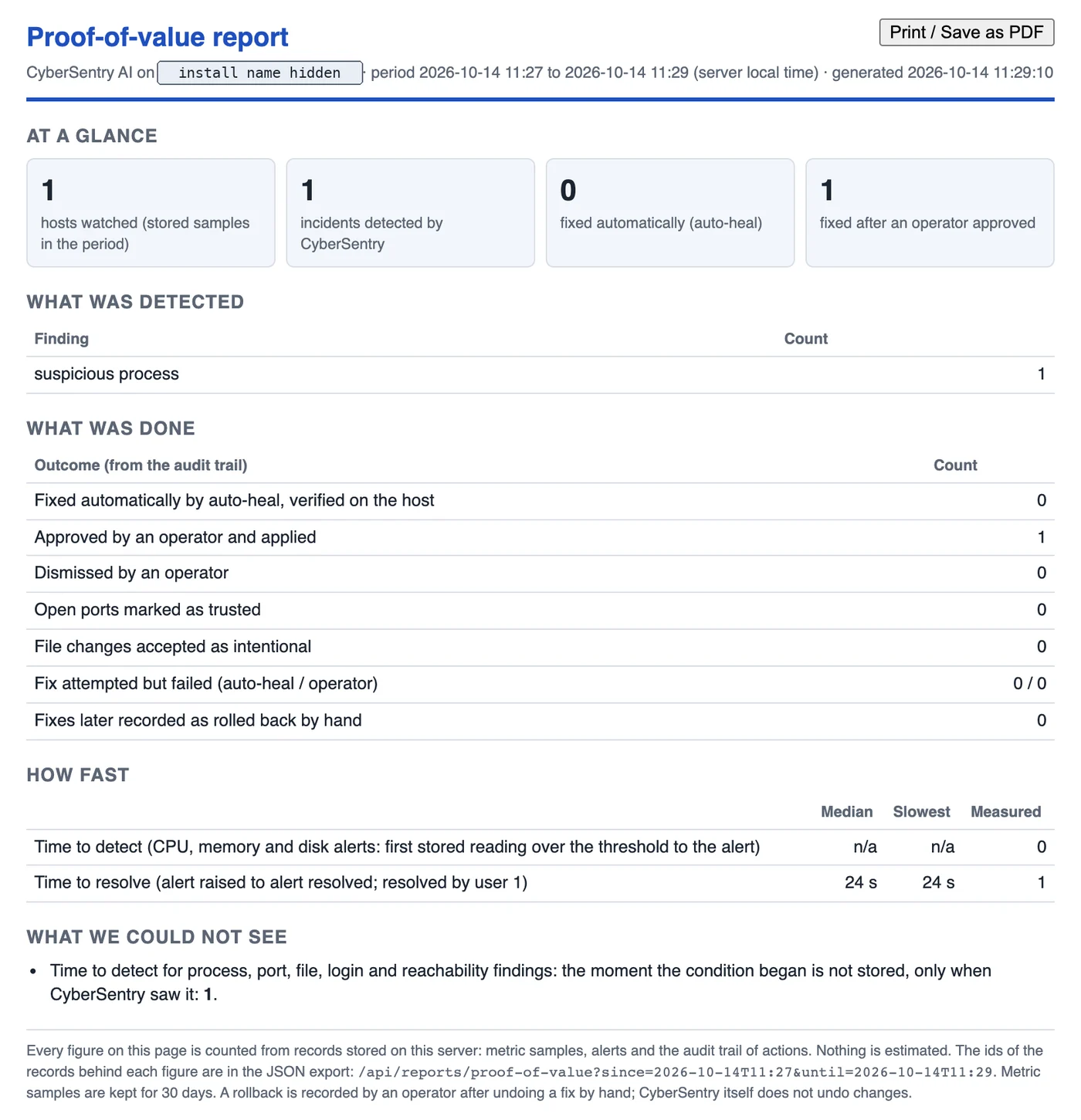
CyberSentry's proof-of-value report for a two-minute lab period: 1 host watched, 1 incident detected, 0 fixed automatically, 1 fixed after an operator approved; the finding was a suspicious process; outcomes from the audit trail; time to resolve 24 seconds; and what the data could not show. Apply was pressed by our recording script, signed in as the operator account. The install name is covered.
Real product report · labGenerated by CyberSentry from its own records for a repeat of the same lab run on 14 Oct 2026. Apply was again pressed by our recording script, signed in as the operator account. The install name is covered.

What the product produces today

A printable one-page report for any period you choose, counted from CyberSentry’s own records: problems found, how many were fixed automatically or after approval, dismissed or failed, how long they took to resolve, and what the data could not show. Every figure can be traced to the stored records through its JSON export. It counts; it does not estimate.

What it does not do yet

  • Write a plain-language summary like the one at the top of this page by itself. We prepared that one from the recording and its record.
  • Show an executive dashboard. That view is not built.
  • Estimate downtime avoided, money saved or business impact. We do not claim them.

In a pilot we write the plain-language summary with you from the stored records, and agree what to measure: investigation time compared with how your team works today, manual steps per problem, and how often fixes were verified, dismissed or failed.

Automation that stays under your control.

Approval comes first

By default, every fix waits for a person on your team. Automatic fixing is a separate switch that is off when CyberSentry is installed, and today it covers only one routine kind of problem.

AI explains, it does not act

An optional AI feature can write the explanations. It never decides on or carries out a fix. The actions themselves are limited to what your team set up and approved.

It works with what you have

CyberSentry adds to your existing IT and security tools, such as antivirus or EDR, backups and your IT provider’s systems. It does not replace them.

Your data stays with you

Monitoring and audit data stay on a server in your network; the product sends none of it to CyberSentry AI. Optional AI and alert services send selected information out only if your team sets them up. One check is on by default: a ping to a public address that detects network loss and carries no monitoring data.

See it on your own servers first.

CyberSentry is early-stage and offered through controlled pilots. A pilot lets you judge it on your own systems before you commit to anything.

What a pilot looks like

  • Free, for about 8 weeks, with no purchase commitment.
  • A few servers you select, watching only at first.
  • Written terms on scope, data and security before anything is connected.
  • A short check-in every two weeks with our team.

What you get at the end

  • CyberSentry’s report for the pilot period, and a plain-language summary we write with you from the stored records.
  • What it proposed, and what your team approved or dismissed.
  • The measures you agreed at the start, such as investigation time and manual steps, collected from the records and from your team. They are measurements, not promised savings.
  • A clear basis for deciding whether to continue.
Discuss a pilot Our team replies within two working days.

Ask CyberSentry what it would mean for your business.

Ask our AI technical companion about control, data, effort and the pilot in plain terms, in a live conversation, without booking a sales call.

What it is
A voice and video conversation with an AI, run by Tavus. You talk to an AI, not a person.
What you need
A microphone. Your camera stays off unless you turn it on.
If it cannot start
It is sometimes busy or unavailable. Use the contact form instead: our team reviews every enquiry. The short answers cover the same questions in writing.
CyberSentry AIAI technical companion
  • Voice and video
  • Camera optional
  • Up to 5 minutes

Start with one of these questions, or ask your own.

Start a conversation

Nothing starts until you press Start on the next screen. A question you pick goes in as your first message; if the companion misses it, ask it aloud.

Talk to our team.

Tell us a little about the systems your business runs on, or simply ask a question. Our team reads every message and replies within two working days.

  • Pilot: free for about 8 weeks
  • Your own servers, watch-only to start
  • Written terms before we connect anything

Prefer email? info@datamobility.com.my

Only your email, your message and the consent box are required.

Add your name and organisation (optional)

AI video companion · up to 5 minutes · camera optional

Ask CyberSentry

Ask what CyberSentry does, explore the technical details, or discuss whether your environment fits.

  • Up to 5 minutes by video and voice
  • You talk to an AI, not a person. It cannot see or control your screen.
  • Questions requiring human confirmation can be sent to the CyberSentry team if you ask

Only your microphone is needed. Your camera stays off unless you turn it on.

This is an AI-powered video conversation. Audio/video may be processed by Tavus to provide the session. Contact information is only submitted if you explicitly request follow-up. Privacy notice

Use the contact form instead

CyberSentry lab demonstration: one runaway job, start to finish

Real product, recorded on 13 October 2026 in an isolated lab container. The Apply Fix click was made by our recording script, signed in as the operator account; the audit records it as actor “user”. Waiting cut, nothing sped up. No sound.

Transcript and recording notes
  1. Detect. A job on a Linux lab server holds a whole CPU core. CyberSentry raises an alert: “High CPU process: backup-compress”, 19 seconds after the job started (the lab profile alerts sooner than a real install, which waits longer for sustained load).
  2. Explain. The fix card says what it found. The job is not on the known-bad list, so a person decides. An optional AI note then puts it in plain language; the AI explains and never decides or acts.
  3. Approve. Apply Fix is pressed under the operator account, by our recording script. Self-healing is off, as it is by default.
  4. Fix. The host’s guarded helper stops the process at once. The Fix Summary Timeline marks it “Manually Applied”.
  5. Verify. CyberSentry reads the host back: “not running after apply (read back from the host)”.
  6. Record. The audit record from the product’s own export: action “apply”, actor “user” (the operator account), the verification text and the time.

About 53 seconds of real time are shown in 22. The captions are ours; everything inside the framed picture is the product or its audit export. Confidence values are covered and the pointer was drawn in for visibility. The test job was started on purpose; no customer system was involved.